

Numza's Biggest Update: Payment Methods, Widgets, and Smarter Tracking
Payment methods, home screen widgets, smarter merchant recognition, and a notification center that only alerts when it matters. New in Numza v1.3.0.
When we first built Numza, the pitch was simple: snap a receipt, and the app figures out the rest. That core experience works now. But the questions we kept hearing from users were different. Not “can it scan faster” but “where did my money actually go, and how do I stop it from going there?”
This update is our answer.
Know how you paid, not just how much
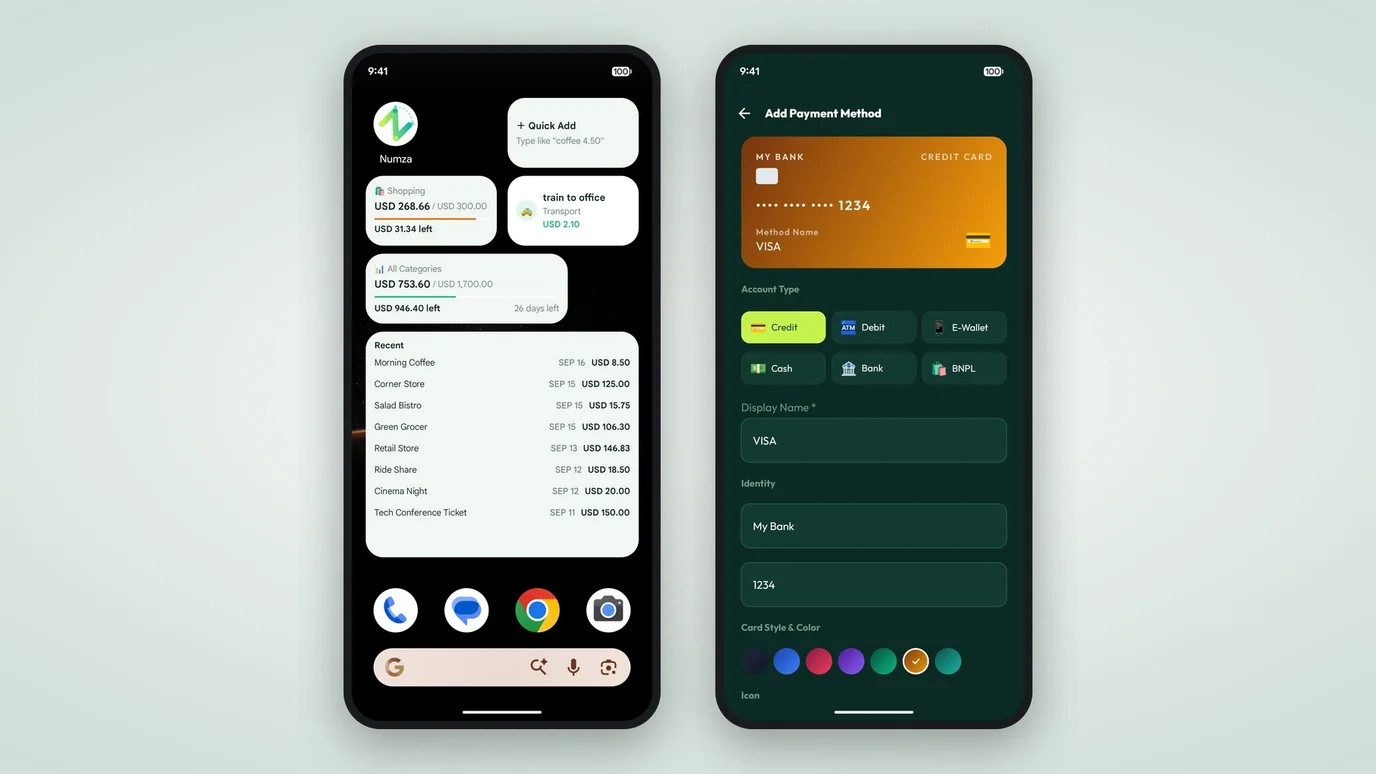
An expense is more than a number. Did you tap your card, transfer from savings, or use the e-wallet you keep forgetting to top up? We added payment method tracking so every expense carries that context. It shows up on the detail screen, in your CSV exports, and eventually in your spending breakdowns. Because knowing you spent money on dining is one thing. Knowing most of it went through the credit card you are trying to pay off is another.
Your money, one glance away
Opening an app to check your budget adds friction. The more steps between you and the number, the less likely you are to look. Home screen widgets put your month-to-date spending right on your home screen. No taps, no loading spinners. They update silently in the background and show a category breakdown so one glance tells you whether you are on track.
We built four widget types: a quick-add launcher for speed-logging, a monthly budget progress bar, a recent transactions list, and a single-category watcher for the one budget you care about most. Pick whichever fits your home screen layout.
Quick Setup: Long-press any empty space on your home screen and select Numza to add widgets. Payment methods can be managed in Settings → Payment Methods or chosen directly on any transaction.
The app learns your habits
A receipt from your regular lunch spot might say one thing. You call it something else. Until now, Numza treated those as different merchants, which meant every scan from that vendor needed manual correction. With merchant alias learning, the app notices when you rename a merchant and applies that correction automatically from then on. The more you use it, the less you type.
Notifications that only matter when they should
We resisted building a notification center for months. Most apps use notifications to pull you back in. We wanted ours to push you back out. Budget alerts now tell you when you are at 80%, at 100%, or over, and then stop. No streaks, no “we miss you” pings. The new notification screen collects your alert history in one place so you can review past warnings without them cluttering your phone.
Numza started as a receipt scanner. It is growing into something more useful: a tool that tells you not just where your money went, but what to do about it.